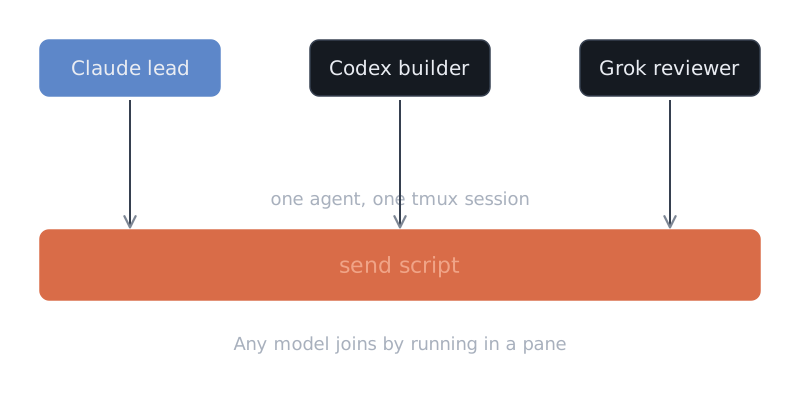
My AI agents come from different vendors. Some run on Claude Code, some on Codex and some on Grok. One Grok pane can run an open-weights model that Ollama serves.
These agents do not share an API, a protocol or a message queue. They share a terminal multiplexer, which is a program that keeps many terminal sessions alive side by side. Almost every message between them goes through plain tmux, driven by one shell script.
Why tmux
Every vendor ships its own way to run sub-agents. Those sub-agents talk to their parent, but they do not talk to an agent from another vendor.
I wanted a Claude lead to hand work to a Codex builder, and I wanted a reviewer on a third model to answer the lead. I also wanted to watch all of it myself. No vendor feature did that.
Every agent I use is a command-line program. It reads text from a terminal and prints text back, so each one already has an input box, and tmux can type into any input box. A new model joins when it runs in a terminal pane, and I can attach to any pane and read what the agents read. Each agent runs in its own tmux session, which I call a lane, and the session name is the address.
The price is that I type into a user interface and not into an API. Most of the trouble in this article comes from that.
Sending a message
The obvious command is tmux send-keys -t <lane> "message" Enter. It fails in practice. If the target agent is busy, the Enter key does not register and the message just sits in the input box.
So I had my agents build a send script, and I set its rules. A call to the script names the target lane and gives a message that starts with the sender’s name.
The script takes one lock per target lane, so two senders cannot type into the same pane at once. Then it reads the screen and finds the real input box. To do this, it must recognise the frame of a Claude, Codex or Grok pane, which is the border and footer that each tool draws around its input box. If the script cannot read the frame, it refuses to send. It pastes the message once, as a single block, so that multi-line text arrives whole. Then it presses Enter and looks at the box again. The script reports success only when it saw its own text in the box, pressed Enter and then saw the box empty.
The script never pastes twice. It can check again as often as it needs, but a second paste turns one message into garbage.
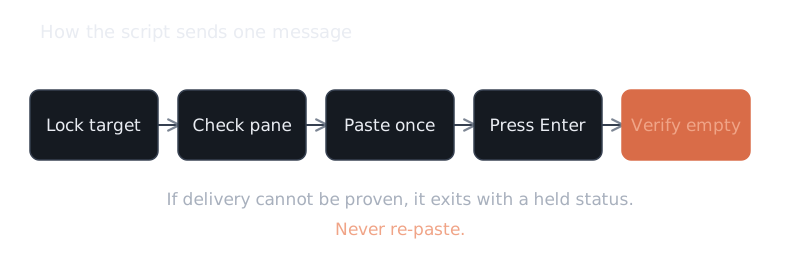
When the script cannot prove delivery, it exits with a “held” status and a machine-readable line. That lets the caller tell apart three cases: nothing was pasted, the text is pasted already, or Enter is pressed already. I added this after a bad incident. A dispatcher retried one handoff over and over, because all it saw was a non-zero exit code and it could not tell what had happened.
I also added a human rule on top of the script. After every send, the sender reads the target pane back. If the whole message is still in the input box, the sender presses Enter and reads again. A message that sits in a box is neither delivered nor discarded, and the target may submit it later, out of context.
Ghost text
The Claude interface shows autocomplete suggestions and the empty-box placeholder in dim grey, while real input uses the default colour. A plain screen capture strips the colour, so an early version of the script could not tell a suggestion from a message. It said “still in box” when nothing was typed, and it said “sent” when it was not.
The fix reads the screen with colour codes, drops the dim runs and counts only the real text after the prompt. A long paste that the interface collapses to a short “pasted text” token counts as real input too.
Signatures, notes and a few rules
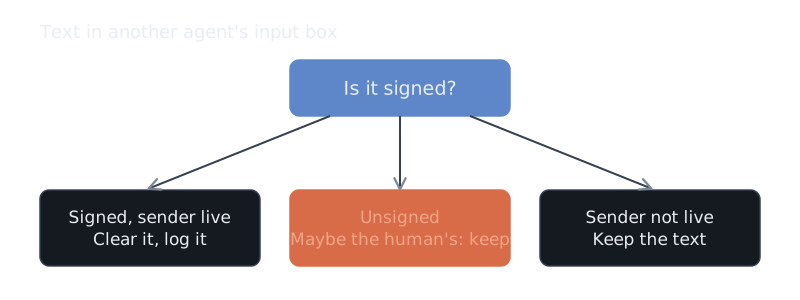
Each message starts with the sender’s name and a colon, like reviewer: ... or lead: .... This signature does a second job: it tells the system whose text is sitting in a box.
If a sender finds a signed line left in another agent’s box, it treats that line as leftover text from an agent. It clears the line, records it in a log and sends its own message. Unsigned text may be mine, because I never sign my own typing, so the script keeps it and does not send over it. If the signature belongs to a session that is not live, the script also keeps the text.
A registry lists each agent with its purpose and model. It is a snapshot and not proof of delivery, so the rule is to read tmux again before acting on it.
One more lesson concerns sessions that run outside tmux, such as a desktop app. Such a session has no pane, and if it takes a name from tmux, tmux gives it the name of another agent. So it signs with a short id of its own and asks the tmux agents to reply in a named file.
Messages are for short pokes, and state goes in a file. Each day has one coordination file, and agents append dated, signed notes about what they changed, what they verified and what they will not touch.
Here is an example. Two sessions edited the same script within a minute, with no claim on the file. One of them wrote the collision into the day’s note, stopped editing and recorded the file checksums. I decided to keep both edits. The note gave me one place to see both and decide.
A few rules reduced the chaos. There is one writer per task, and other agents’ work and claims stay intact. A pause from me beats any agent message, so an agent never infers permission to resume from another agent’s note. And every agent message ends in an action, either clear the box or send it. I set that last rule after an agent left text in a peer’s input box and I had to say so more than once.
What broke
The script’s backup files read like a changelog, each with a date and a reason. Several real incidents were refusals and not bad pastes, because the script has to recognise each pane layout or it will not send.
- A conversation that someone renames from outside shows a custom title on its border and not the agent’s name. Every handoff to that agent stayed held until the parser accepted the title.
- The model row can also show a folder label, a branch suffix or a label with punctuation. Each new form held some agent until I widened the parser.
- The footer can grow a task list and monitor counts. The parser now requires a known structure and refuses unknown trailing text.
- Grok panes use a rounded box and not a rule frame, so the first version read them as unreadable.
Grok was its own problem. A Grok agent that is in the middle of a turn queues a prompt and does not always submit it. For that case I address the Grok conversation by its session id, and the script holds if it cannot prove delivery. It never falls back to a pane paste. After a queued send, I check that the message landed when the turn ends, and if it did not, I press Enter once and verify.
The test suite drives a fake agent in a real tmux server. It covers a foreign draft that must stay, a busy pane, ghost text and unknown footers.
What I’m not happy with
The script types into a user interface, so a vendor update to the layout can break frame detection. One update added a new agent-list row and held every agent that had helpers running. The script refuses to guess. That is safe, but an agent can become unreachable until I update the parser.
Delivery is verified, but understanding is not. The script proves that text arrived, and it cannot prove that the agent read it.
I also tried a mailbox. I built an agent-to-agent mailbox on SQLite and Claude hooks. Unread mail arrives as context on the next prompt, and a wake-up sends only one short word through the same tmux script. It ran as a pilot on two agents. Hooks exist only for tools that support them, so plain tmux stays the fallback.
If I started again, I would write the signature rule on day one. I added it only after agents kept mistaking each other’s leftover text for my drafts. I would also test against real frames first, since I found most pane layouts in live use. I would return a machine-readable outcome from the start, because the retry storm came from a bare exit code. And I would keep state in files and not in boxes.
A terminal is the one interface that every agent from every vendor already has. If I build on it, a new model does not need an adapter, just a pane and a name.
If you want agents from different vendors working together in your setup, email hello@jeffkent.dev.